Clawdbot (now Moltbot): Everything You Need to Know About the Viral Personal AI Assistant
In January 2026, a new kind of AI assistant took the internet by storm. It began life as Clawdbot, a tool that could run on a computer and do real tasks for users. People talked about it everywhere because it could schedule messages, check calendars, and act like a personal helper without needing a web browser. But on January 27, 2026, its name changed to Moltbot after a trademark issue with another AI company.
Moltbot is still open‑source and still strange in a good way. Instead of just chatting back and forth, it works in the background. It connects to apps and systems you already use. Tech fans online call it a glimpse of what future AI assistants might actually feel like.
What Is Moltbot? The New Name for a Viral AI Assistant
Moltbot is a personal AI assistant that has taken the tech world by surprise. It used to be known as Clawdbot but changed its name on January 27, 2026, after a trademark request from Anthropic, the company behind the Claude AI model.
This tool is not like the chatbots most of us know. It does things instead of just talking. It runs on your own machine or server and works across apps you already use, such as WhatsApp, Telegram, Discord, Slack, Signal, and iMessage. It keeps memory of past chats and learns your preferences, so it feels more personal over time.
What sets Moltbot apart is that it can perform real tasks. It can read and respond to messages, manage your calendar, automate workflows, run scripts, control your browser, and handle files, all without constant prompts.
How Moltbot Works: Architecture & Core Features
Moltbot runs locally on your device, meaning your data stays with you rather than being stored in the cloud. This “local‑first” design helps protect privacy and gives users control over the assistant. It can be installed on Mac, Windows, and Linux systems with a single command.
After setup, Moltbot connects to messaging platforms you use every day. You can send it commands through apps like WhatsApp or Telegram, and it will act on them autonomously. This means you can ask it to schedule meetings, draft emails, manage files, extract data, or automate repetitive actions without logging into a separate AI service.
Another core feature is its persistent memory. Moltbot keeps context across conversations and tasks. It remembers your settings, preferences, and past interactions. This lets it give more thoughtful and relevant help over time.
Moltbot’s Unique Selling Points: What Sets It Apart
Moltbot strikes a balance between automation and privacy. Unlike standard chatbots that answer questions and forget, Moltbot remembers and acts. Its memory lets it anticipate needs and follow up independently.
Because it runs on your own hardware, you retain ownership of your data and can customize what the assistant can access. You do not depend on a third‑party cloud service to store your messages or personal details. The open‑source nature also means developers around the world contribute to its growth and transparency.
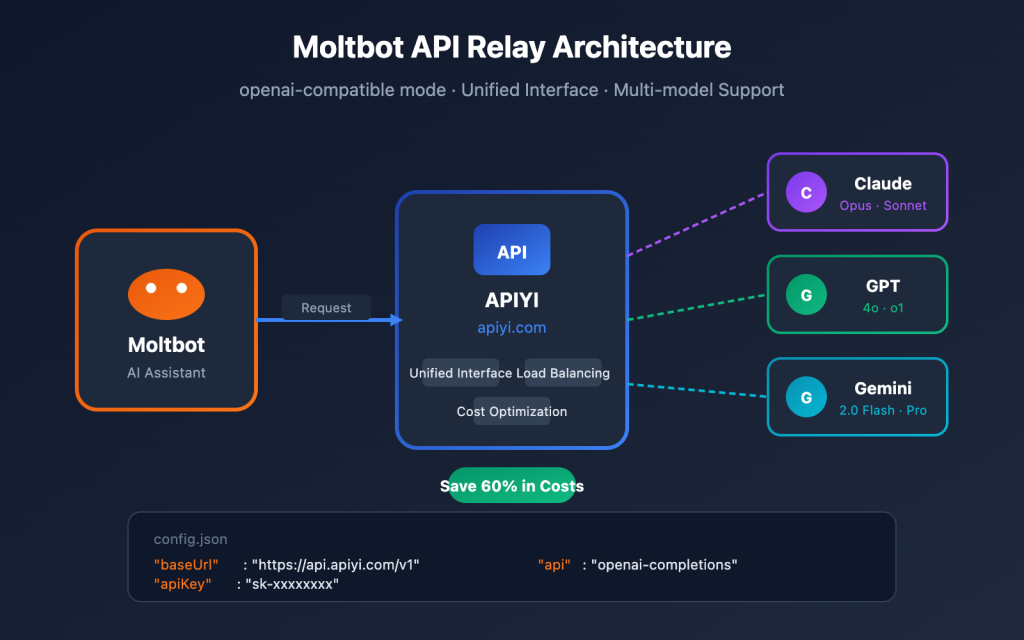
Moltbot also supports multiple AI engines, so users can switch between models like Claude, OpenAI’s GPT, or even local models depending on their needs.
Real‑World Moltbot Use Cases Driving Its Viral Popularity
One popular use is inbox and calendar automation. Moltbot can read your emails, draft responses, and even schedule meetings for you through messaging apps. It can also automate browser tasks, such as filling forms or extracting data from web pages.
Users have even connected Moltbot to development workflows. It can write code, test scripts, and update projects based on simple commands in chat apps, turning it into a hands‑free coding helper.
Some people have set up Moltbot on older devices like unused laptops or Mac Minis so it runs continuously. This idea of a 24/7 AI that operates like a digital assistant has captured the imagination of developers and hobbyists alike.
Why It’s Going Viral: The Tech Pulse & Investor Buzz
Moltbot spread quickly on social platforms and developer forums as people shared creative and practical automations. Its ability to run locally and manage real tasks made it stand out from typical chatbots.
In an unexpected twist, the buzz even affected financial markets. Cloudflare’s stock saw a notable rally after users suggested using Cloudflare Tunnel to expose Moltbot securely online. This excitement helped reinforce the company’s image in the AI infrastructure space.
Moltbot Risks & Controversies You Must Know
Moltbot’s power comes with risks. Because it can execute commands on your system, security experts warn about vulnerabilities like prompt injection, where a harmful message could trigger unwanted actions.
The rebranding process also led to impersonation and scams. Fake cryptocurrency tokens and hijacked social accounts appeared during the transition from Clawdbot to Moltbot, prompting warnings from the project’s creator.
Also, the setup can be technical. Users who are not comfortable with command lines or server configurations might find the installation and management challenging.
Closing Note: The Future of Personal AI Is Here
Moltbot marks a new chapter in AI assistants that do more than chat. It blends automation, persistent memory, and privacy into a single tool you run on your own hardware. The challenges around security and complexity remind users to be careful, but the rapid adoption shows there is real demand for assistants that act, not just respond.
In the coming months, tools like Moltbot could shape how individuals and teams rely on AI for daily tasks, automation, and workflow management. Its rise shows that the world is ready for AI that is personal, powerful, and proactive.
Frequently Asked Questions (FAQs)
Moltbot is a personal AI assistant that can act on your commands. It was renamed from Clawdbot in January 2026 after a trademark request but still works the same.
Moltbot runs on your own device and keeps data local. But it has risks like possible malware or prompt tricks, so careful setup and limits are important.
You install Moltbot on Mac, Windows, or Linux using a simple command or installer. Then connect it to apps like WhatsApp or Telegram to use it.
Disclaimer
The content shared by Meyka AI PTY LTD is solely for research and informational purposes. Meyka is not a financial advisory service, and the information provided should not be considered investment or trading advice.